Sound
Playback and output-path issues when Windows audio is not behaving as expected.
Remedexa may examine relevant:
- playback-device state
- Windows audio components
- configuration relevant to the selected output
- validation of the affected audio path
Remedexa is currently in development and is not yet available for purchase.
Supported problem areas
Remedexa organizes troubleshooting around real Windows functions and applications rather than a generic system-wide error scan.
These are problem areas in scope for Remedexa. Coverage within each area will continue to evolve.
Coverage
Each area is a class of Windows problems, not a promise that every possible failure is already handled. The examples describe intended scope.
Select a problem area to see what Remedexa may examine. Coverage is in scope, not a promise that every failure is already handled.
Playback and output-path issues when Windows audio is not behaving as expected.
Remedexa may examine relevant:
Input-device issues when a microphone is unavailable or not usable.
Remedexa may examine relevant:
Availability and configuration issues that prevent Windows or apps from using the camera.
Remedexa may examine relevant:
Connection issues associated with the network interface and related Windows networking components.
Remedexa may examine relevant:
Bluetooth device and connection state, including related Windows Bluetooth components.
Remedexa may examine relevant:
Windows service health and repair or update failures.
Remedexa may examine relevant:
Resource pressure and related evidence when the device feels slow.
Remedexa may examine relevant:
Printer and scanner availability, queue, service, device, and configuration issues.
Remedexa may examine relevant:
Battery, charging, and power-state issues reported through relevant Windows evidence.
Remedexa may examine relevant:
Application or Windows reliability problems investigated through relevant local failure evidence.
Remedexa may examine relevant:
Sound
Playback and output-path issues where Windows audio is not behaving as the user expects.
Microphone
Input-device problems when a microphone is unavailable or not usable by Windows or applications.
Camera
Camera availability and configuration issues that prevent Windows or applications from using the device.
Bluetooth
Bluetooth device and connectivity state, including related Windows Bluetooth components.
Displays & Docks
Display detection and external monitor or dock-related Windows state.
USB
Recognition and state of connected USB devices.
Hardware & Drivers
Device and driver state using Windows-reported hardware evidence.
Keyboard / Mouse / Touchpad
Input-device availability and state for keyboard, mouse, and touchpad.
Printer / Scanner
Printer and scanner availability, queue, service, device, and configuration issues reported by Windows.
Wi-Fi & Network
Connectivity problems involving the network interface and relevant Windows networking components.
Teams
Windows and Teams client troubleshooting relevant to the affected function.
Outlook & Office
Windows Office and application-state troubleshooting.
OneDrive
Synchronization and OneDrive client-state troubleshooting.
Windows Sign-in
Windows sign-in state, including Entra or WAM-related state where applicable.
Windows Repair & Update
Windows servicing health and repair or update-related failures.
Performance / Device Slow
Resource pressure and related Windows evidence when a device feels slow.
Battery / Charging / Power
Battery, charging, and power-state issues using relevant Windows-reported evidence.
Crash / Reliability
Application or Windows reliability problems investigated through relevant local failure evidence.
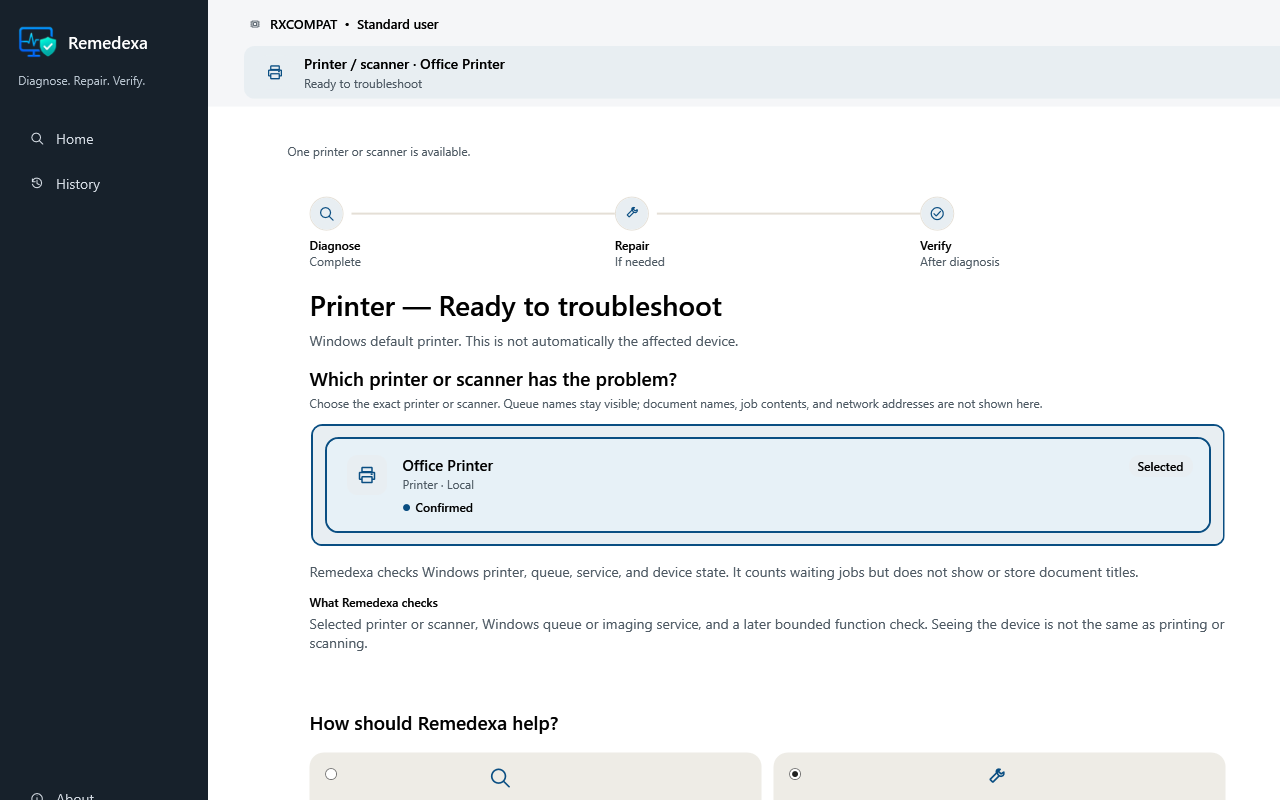
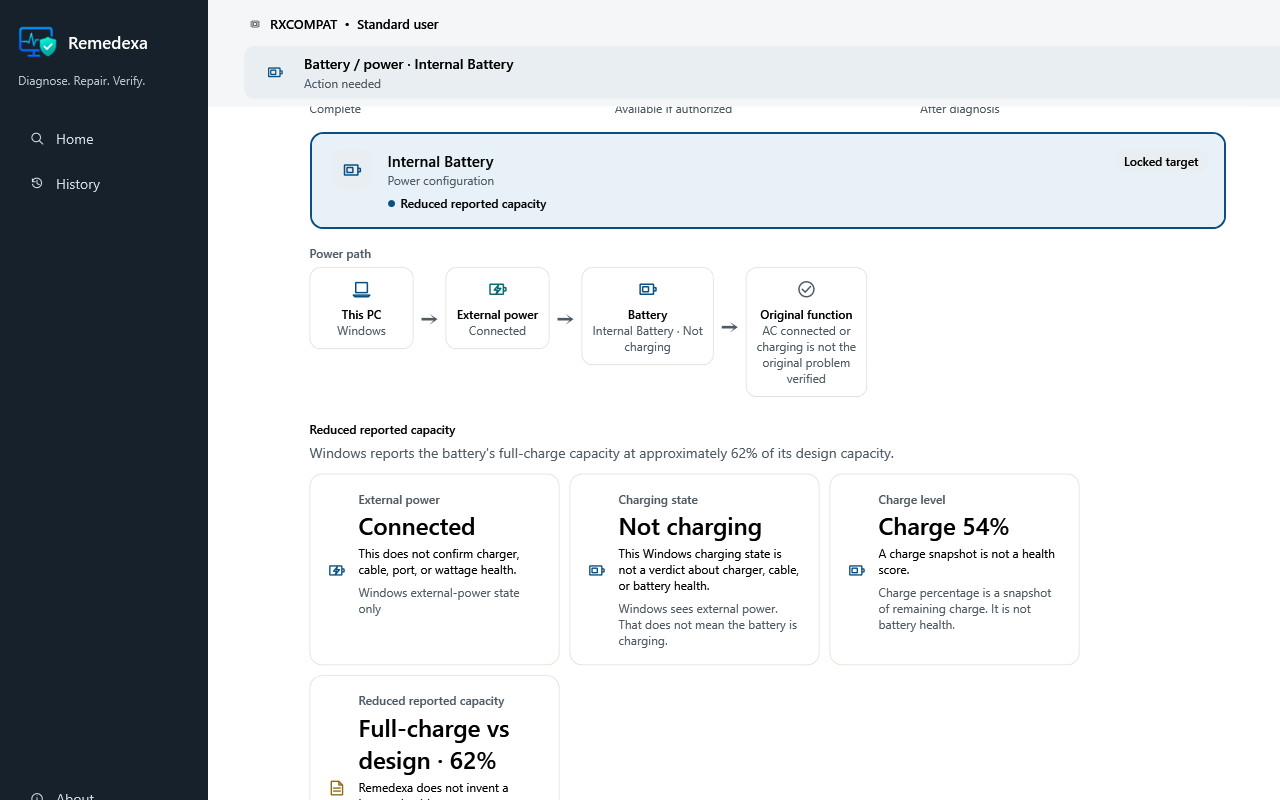
These reviewed synthetic examples show what Remedexa can report for one printer, battery, or reliability state without exposing user content or claiming an unproven cause.
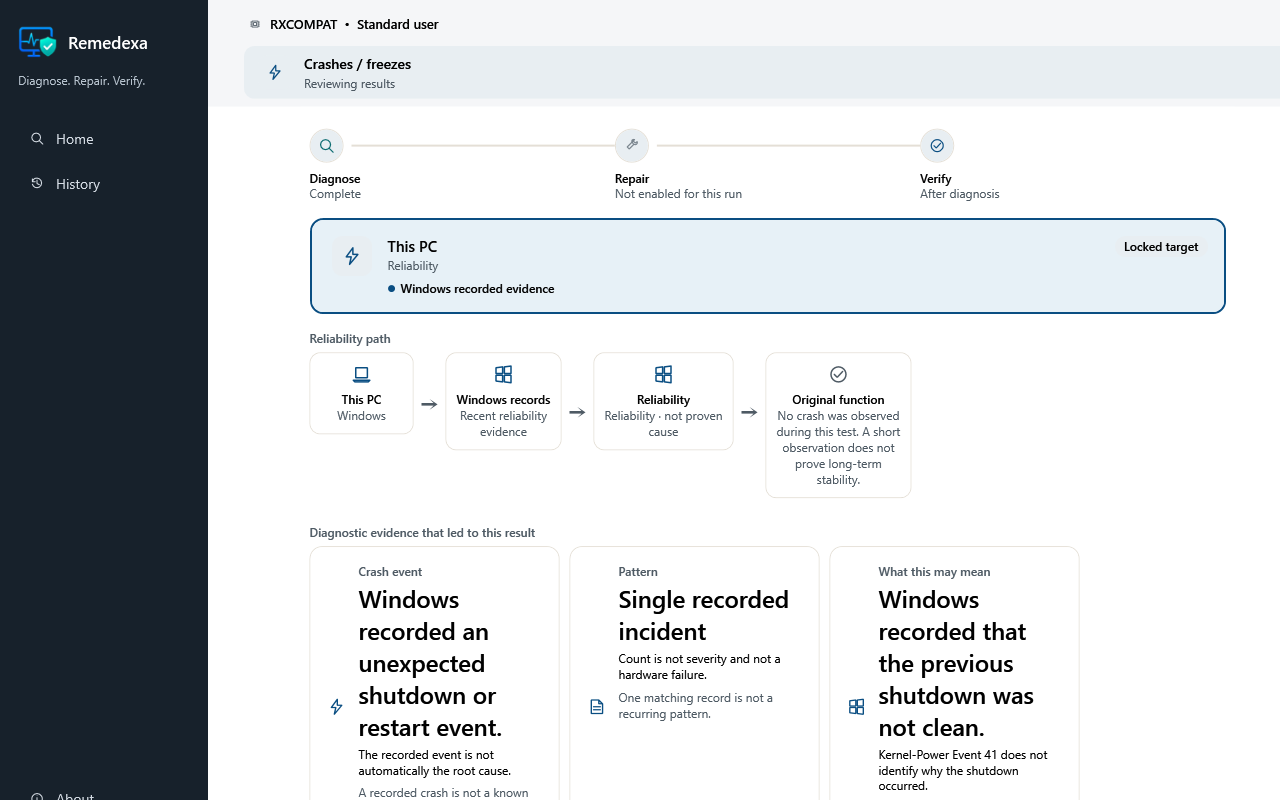
The same method
For each supported problem profile, Remedexa is designed to follow the affected function through evidence, diagnosis, targeted repair where appropriate, and validation.
Start from the Windows function or application that is not working.
Gather technical evidence related to that problem area.
Identify a technical conclusion where the evidence supports it.
Apply a conservative change when an appropriate repair exists.
Retest the same function before treating the issue as resolved.
A completed repair is not treated as success until the same function works again.
When automation is not appropriate
Remedexa should not attempt arbitrary changes simply because an issue exists. An honest unresolved result is more useful than a claimed fix.
Remedexa may identify the technical situation without having a safe automated repair.
A setting, credential, or physical action may still be required after diagnosis.
Failed hardware or an external service is outside what local software can restore.
Home keeps the result for the user. Business can use it for structured escalation.
Home and Business
Home uses diagnostic, repair, and validation capabilities for the user’s PC. Business uses the same foundation and can add structured support escalation and lightweight organizational context.
Remedexa Home
Local diagnosis, conservative repair, and same-target validation.
Learn about HomeRemedexa Business
The same engine, with structured support when a local repair is not enough.
Learn about Business