More time doing the job
Start diagnosis on the employee’s PC instead of waiting for help with every common issue. The goal: less downtime and a faster return to work.
Remedexa is currently in development and is not yet available for purchase.
Remedexa Business
Reduce employee downtime and repetitive support work. Remedexa Business brings diagnosis, targeted repair and verification to the PC, with planned remote support when the problem needs a person.
A tool for your employees. Support for your business. Subscription model in development.
Prefer email? business@remedexa.com
Why organizations care
An IT problem consumes both the employee’s time and the time of whoever helps them. Business is designed to reduce that repeat work: employees start on their own PC, with human support when it is still needed. That can reduce the need for dedicated in-house first-line support, or give your existing team more time for higher-value work.
Start diagnosis on the employee’s PC instead of waiting for help with every common issue. The goal: less downtime and a faster return to work.
Diagnosis, targeted repair and retesting in one workflow. When escalation is needed, technical context helps reduce repeated questions and troubleshooting.
For businesses without an IT team, planned Business combines the tool with remote help when needed under an eligible subscription.
See where the value comes from
Remedexa retests the affected function after a repair. Successful verification helps the employee get back to work with more confidence. If the problem remains, the workflow preserves what was tried to support the next step.
Explore the app screenshots and workflow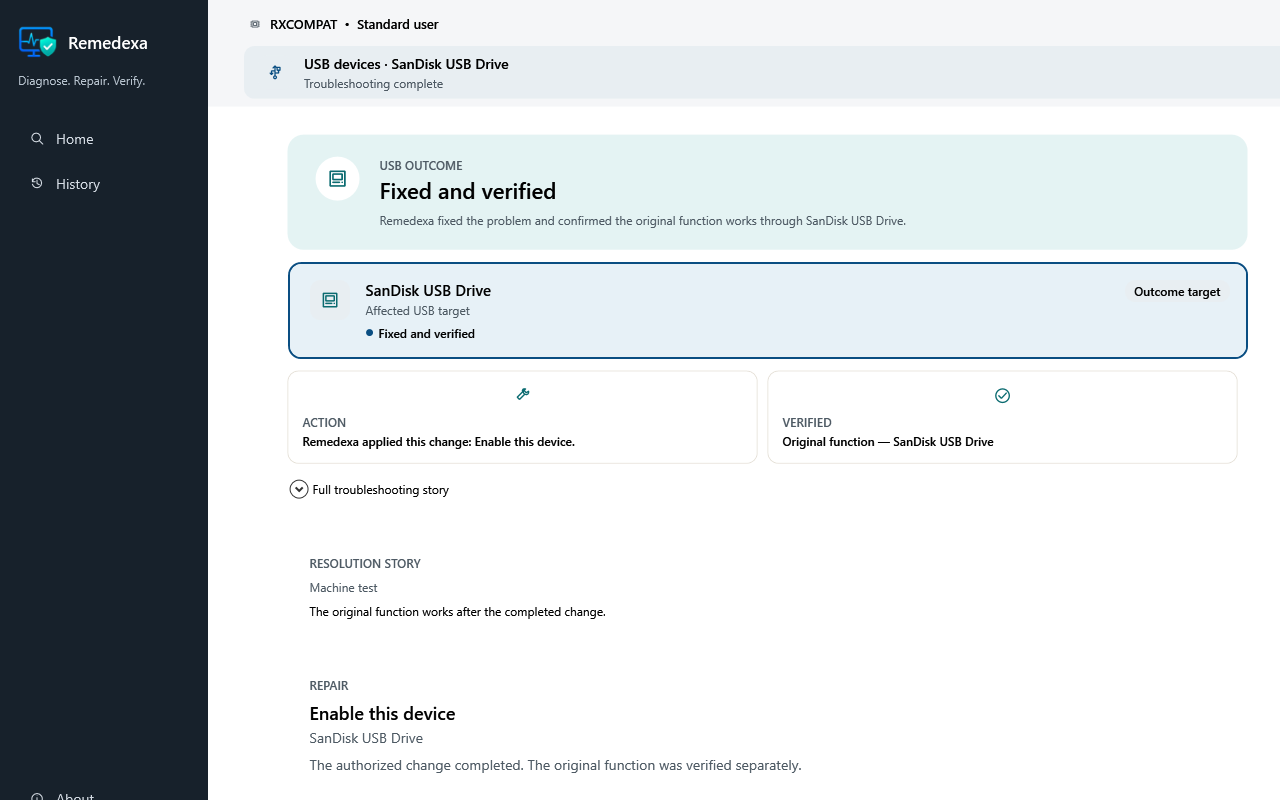
Build your business case
Replace these illustrative assumptions with your support records, then validate them in a pilot. These are not measured Remedexa results or a savings promise.
Estimated monthly value of time
Enable JavaScript to calculate a result from your inputs.
Capacity for useful work, not guaranteed payroll or cash savings. Subscription, setup and other costs are not deducted.
For each group: incidents × expected minutes saved ÷ 60 × hourly cost. We add employee and support time as separate groups. Never count the same time twice; enter zero support minutes if employees handle their own troubleshooting. Use averages that include unresolved incidents and time spent using the tool or attending remote sessions. To assess net value, subtract the subscription quote, setup and other incremental costs. Business pricing has not been announced.
A first step for recurring Windows problems, with planned remote human help when needed. This can reduce the need to dedicate a first-line support role to those tasks alone. Networks, security, backups, infrastructure and onsite repairs still need an appropriate owner or provider.
Give employees a self-service path for supported issues so your team can focus on complex cases and projects. Planned escalation starts with diagnostic context and prior steps rather than restarting the investigation.
The planned Business model includes support tickets and attended remote assistance under an eligible active subscription. Scope, service hours and response times will depend on the accepted offer when available. Public purchase is not open, and no 24/7 service promise is made.
Employee experience
The intended journey stays on the PC. An employee can select a problem area or describe the symptom in their own words; deterministic intake suggests a supported profile, and the employee confirms it before troubleshooting begins. It is not an AI assistant. The Resolution Story and History remain local to that PC—not employee monitoring or organization-wide visibility. Human support is used only when local troubleshooting cannot resolve the issue.
Something on the Windows PC is not working.
Start from the affected area or problem.
Remedexa investigates the technical cause where possible.
A targeted repair is applied when appropriate.
The same function is retested.
Verified issues stop. Unresolved issues can escalate with diagnostic context.
Same engine
Home and Business share the same Remedexa troubleshooting foundation: detect, diagnose, isolate, safe repair, retest, and verified. Business adds the organizational layer around that engine.
Shared foundation
Diagnosis, targeted safe repair, and same-target validation are the same product idea in both editions. Business is not a thinner or thicker repair engine.
Business adds
Support workflow
If validation succeeds, the loop stops. If the issue remains unresolved, Remedexa is intended to carry technical evidence into a support case, technician triage, and attended remote support if needed.
Illustrative support path
On the PC
Validation succeeds
Validation succeeded. The loop stops. No escalation is required.
Problem remains
Get Support
When local troubleshooting is not enough
Remedexa does not mark the issue as resolved. The next step is structured human help.
The unresolved outcome stays attached as structured diagnostic context.
Get Support is intended to open a case instead of starting from a blank description.
A person can review what was already tried on the PC.
If needed, a technician can join the session to continue the work.
Support evidence
Escalation is designed around sanitized technical evidence. Remedexa is designed to avoid collecting unnecessary personal content while retaining what support needs to continue the work.
Designed to avoid collecting
Structured escalation
When automated troubleshooting cannot resolve the issue, Get Support is intended to carry sanitized technical context into a support case. A technician can review what was already tried before connecting.
Structured diagnostic evidence is intended to travel with the request so triage starts from what the PC already showed.
If human help is still needed, a technician can join remotely with the employee present. This is attended assistance when required, not standing remote access.
Regional focus
Remedexa Business is being prepared initially for organizations in Saudi Arabia and the wider MENA region. The product design remains usable internationally. Commercial availability has not been announced.
Later capability
Business is intended to add organization and entitlement context around troubleshooting. Broader company and device management is a later capability, not part of the current marketing claim.
Business FAQ
Both use the same Remedexa troubleshooting foundation. Home is a one-time purchase for a person’s own PCs. Business is a subscription that adds organization context, Get Support, support cases, structured escalation, and attended remote support when needed.
No. The intended model is first-line troubleshooting on the employee’s PC. Human support is used when local diagnosis and repair cannot resolve the issue.
The issue is not marked resolved. Business is intended to open Get Support with structured diagnostic context, then a support case, technician triage, and attended remote support if needed.
Attended remote support is part of the intended Business model when local troubleshooting is not enough. It is not available yet.
No. Remedexa’s troubleshooting and support workflows are not designed as employee-surveillance tools. They are not screen monitoring, keystroke monitoring, or productivity surveillance.
Remedexa Business is still in development. It is being prepared initially for organizations in Saudi Arabia and the wider MENA region. Commercial availability has not been announced. Organizations interested in discussing the product or a future pilot can contact the Remedexa Business team.
Next
Remedexa Business is still in development. Organizations interested in discussing the product or a future pilot can contact the Remedexa Business team. This is an enquiry path, not a support entitlement or a pricing quote.
The enquiry form opens on Zoho Forms. Share only the business details needed to discuss fit; do not include passwords, employee records or diagnostic files. Opening the form does not submit an enquiry. Complete its submission step and check the confirmation shown there. If it fails, use the email below. How enquiry information is used.
Prefer email? business@remedexa.com