Path A
Validation succeeds
- Diagnosis
- Repair
- Retest
- Validation succeeds
- Verified / Resolved
Remedexa is currently in development and is not yet available for purchase.
How Remedexa works
Diagnose. Repair. Verify.
Remedexa starts from the function that is actually failing, gathers relevant technical evidence, narrows the problem to the affected target, makes conservative changes when an appropriate repair exists, then tests that function again.
Start with your words
Remedexa uses deterministic natural-language intake to suggest a supported problem profile. It may ask for clarification, and it does not launch troubleshooting until you confirm the suggestion. This is not an AI assistant.
The working model
A repair command completing successfully is not the same thing as the user’s problem being resolved. Remedexa only treats an issue as resolved when validation of the affected function succeeds.
What actually happens
This is the Remedexa loop in more detail. The same foundation is used for Home and Business. The exact evidence and repair depend on the problem profile.
Detect
Troubleshooting begins with the function or problem the user is actually experiencing. Remedexa does not invent a list of warnings in order to justify work.
Diagnose
Remedexa gathers technical evidence relevant to the selected problem area. The exact method depends on the profile. Windows state, device state, service state, configuration, connectivity, application state, or relevant Windows diagnostic evidence may all be in play. The same diagnostic method is not assumed for every problem.
Isolate
Where the evidence supports it, Remedexa narrows troubleshooting to the affected target rather than applying broad system changes. This is not a claim that Remedexa always finds a perfect root cause.
Repair
When an appropriate repair exists, Remedexa is designed to make a targeted, least-disruptive change related to the diagnosis. Unrelated system changes and arbitrary driver downloads are avoided. Windows-native or supported mechanisms are preferred where appropriate. Conservative repair is not a claim that no risk exists.
Retest
Successful execution of a repair step does not prove that the original function now works. Remedexa returns to the affected target and runs an appropriate validation where the profile supports it.
Verified
If validation succeeds, the issue can be treated as resolved. If validation still fails, Remedexa does not call it resolved. Home keeps the diagnostic outcome available to the user. Business can use an unresolved result as the basis for structured support escalation.
Reviewed product walkthrough
These reviewed frames use synthetic data from a disposable Windows 11 VM. Each sequence is labeled so separate example sessions are never presented as one incident.
Swipe, scroll, or focus this list and use the arrow keys to follow all six steps.
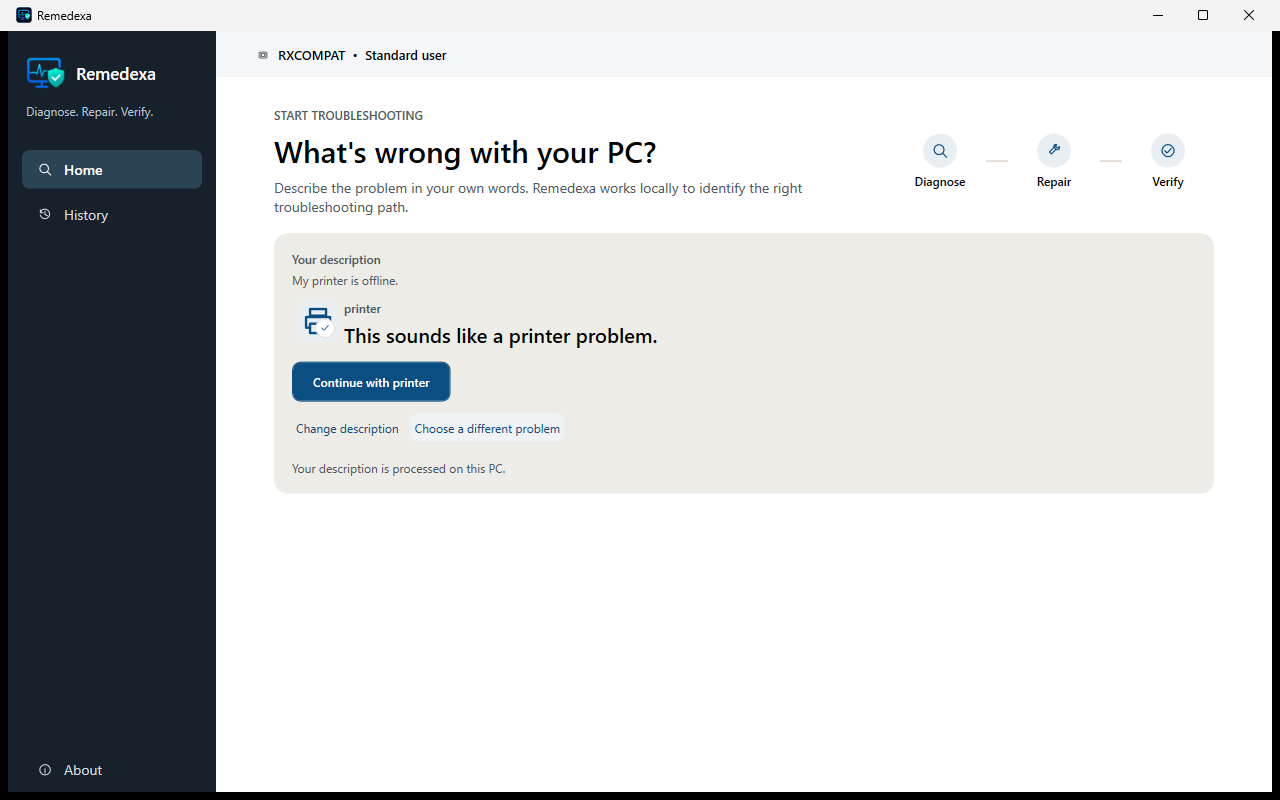
Printer example · before a change
Intake
A synthetic printer description maps to a supported profile. Remedexa waits for confirmation before troubleshooting starts.
From the symptom to explicit consent: These three frames belong to one deterministic synthetic printer path. No document names, queue contents, or real user data are shown.
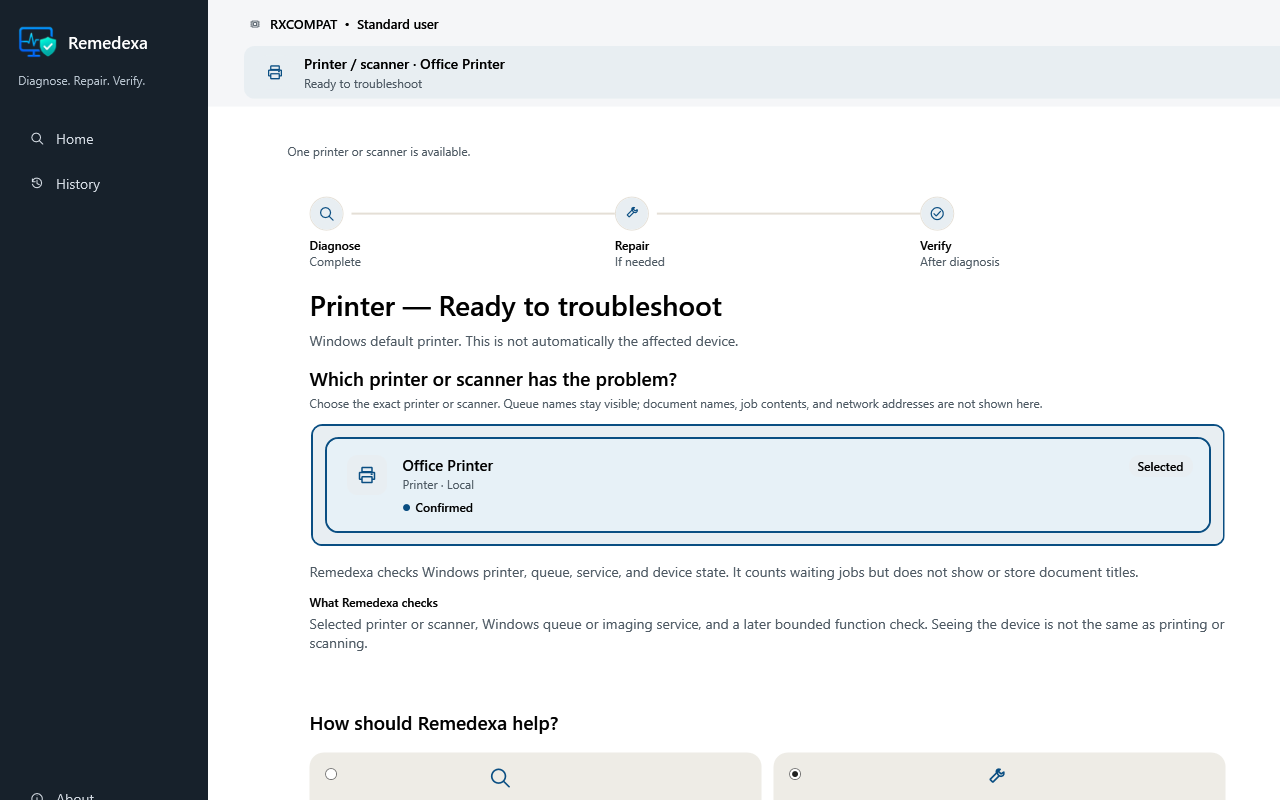
Printer example · before a change
Evidence
Remedexa identifies the synthetic Office Printer and states the privacy limit before any repair is offered.
From the symptom to explicit consent: These three frames belong to one deterministic synthetic printer path. No document names, queue contents, or real user data are shown.
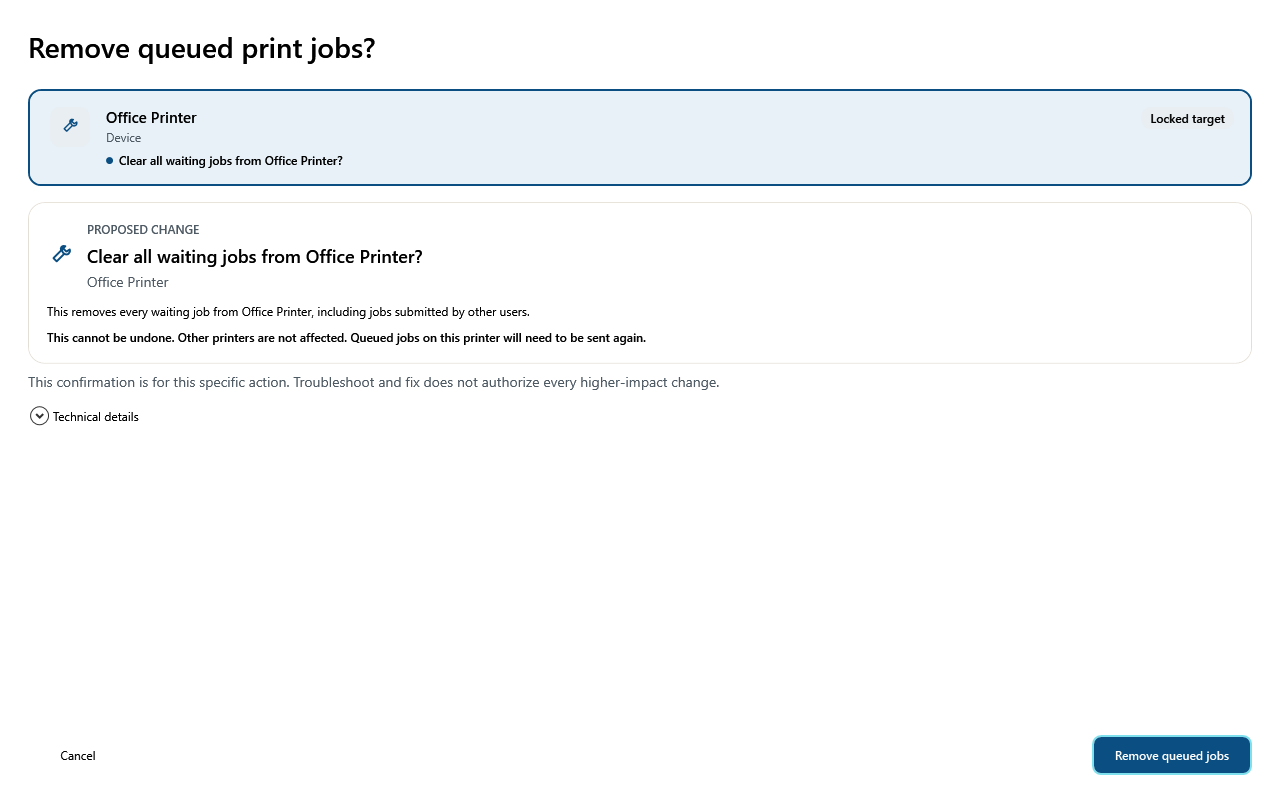
Printer example · before a change
Safe action
The consent step names the locked target, irreversible consequence, and limits. Cancel remains a separate choice.
From the symptom to explicit consent: These three frames belong to one deterministic synthetic printer path. No document names, queue contents, or real user data are shown.
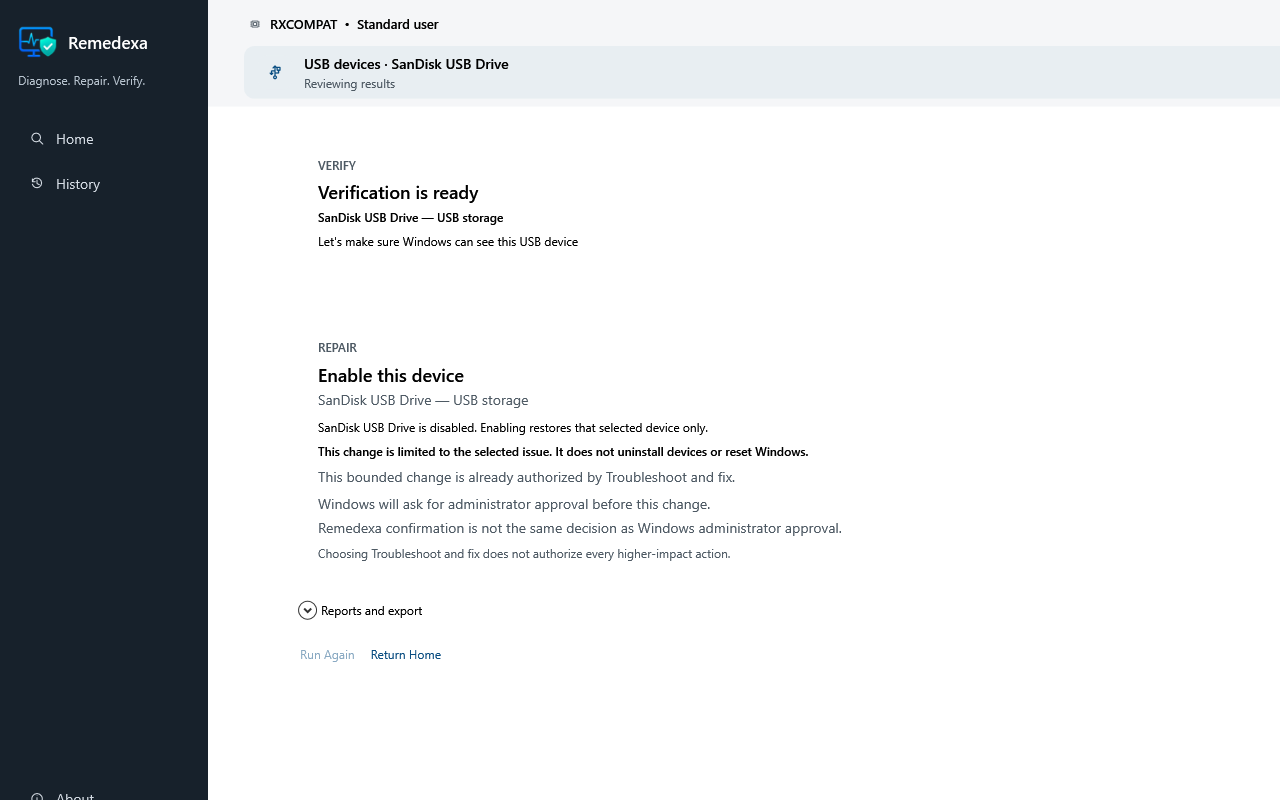
USB example · validation
Exact target
The selected synthetic USB device, bounded Enable repair, and verification readiness remain visible before a change.
Keep the action and outcome separate: This is a separate deterministic synthetic USB session; it is not presented as the outcome of the printer example above.
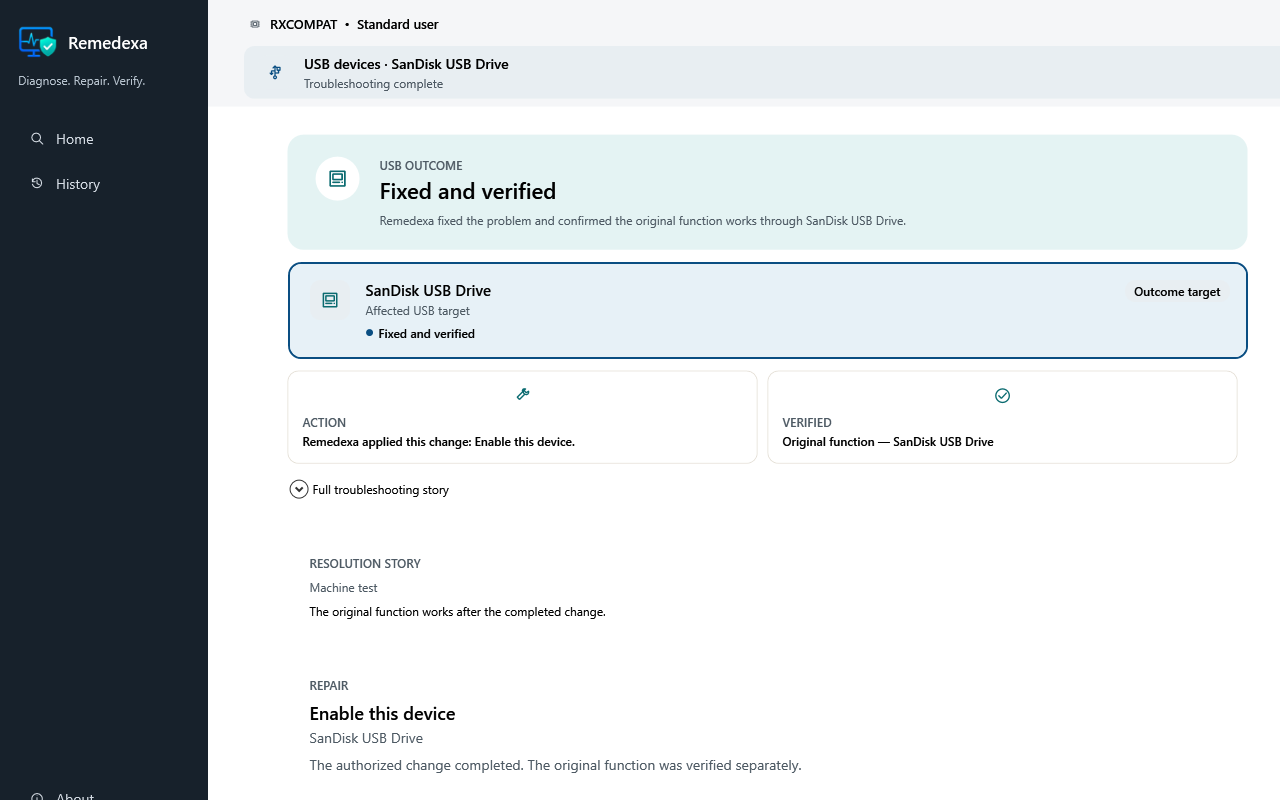
USB example · validation
Verified outcome
Resolved is supported only when the original function succeeds during validation; a completed command alone is not enough.
Keep the action and outcome separate: This is a separate deterministic synthetic USB session; it is not presented as the outcome of the printer example above.
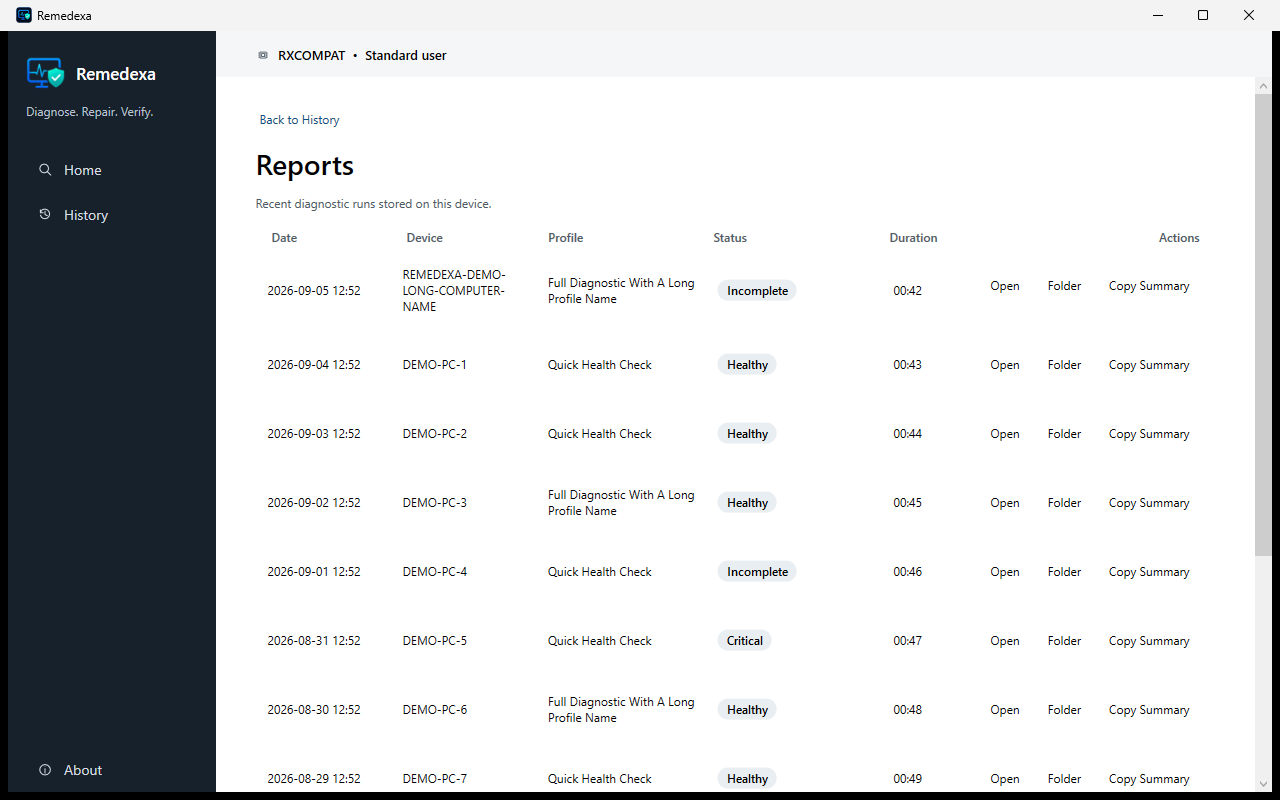
Local record · after the session
History
Meaningful sessions keep their Resolution Story so the user can understand what happened and choose what to do next.
Return to a truthful History: History is stored for the current Windows user on that PC. It is not monitoring, cloud sync, telemetry, or a support-ticket history.
Retest
Remedexa returns to the affected target and runs an appropriate validation where the profile supports it. That is the measure, not the exit code of a repair step.
Repair completed
Problem resolved
Illustrative example
Repair completed
Retesting…
Verified
Still failing
Not resolved
The affected function works again. The issue can be treated as resolved.
The function still fails. Remedexa should not call the issue resolved.
Two validation branches
Successful validation of the original symptom can support Resolved. Any other result must preserve what remains unknown or unfinished instead of turning partial evidence into a success claim.
Path A
Path B
Home keeps the outcome for the user. Business can then add Get Support. Home does not include human support.
Repair attempted
Resolved
Improved
Restart required
External dependency
No issue
Could not test
Why this matters
Low-trust PC utilities often scan broadly and then make generalized changes. Remedexa is designed around the function that is actually failing.
Broad scanning can produce a lot of information without establishing what caused the user’s actual problem.
A repair command may return success even if the user-visible problem still exists.
Remedexa is designed around the affected function and whether that function works again after a change.
Remedexa does not invent warning counts or treat a broad scan as proof that the actual problem is understood.
Troubleshooting History
History answers “What has Remedexa helped me with?” Meaningful sessions keep a truthful, read-only Resolution Story under the current Windows user.
A meaningful, user-started session saves its read-only Resolution Story under the current Windows user.
Reopening shows the past session exactly as saved. Troubleshoot again starts the current profile through fresh discovery and confirmation.
Clear history requires confirmation and removes the dedicated local History records for this Windows user.
History is not monitoring, cloud sync, a support-ticket timeline, telemetry, company visibility, or cross-device storage.
Home and Business
Both editions use the same troubleshooting foundation. The difference is what happens around that loop.
Remedexa Home
Troubleshooting is primarily performed on the Windows PC. Home requires legitimate activation, after which the perpetual entitlement is designed to remain usable offline.
Remedexa Business
Business uses the same troubleshooting foundation. It can add organizational context and structured escalation when local troubleshooting cannot resolve the issue.
Next
Remedexa is not available for purchase yet. These pages explain what each edition is intended to include.
Remedexa Home
Local diagnosis, conservative repair, and same-target validation.
Learn about HomeRemedexa Business
The same engine, with structured support when a local repair is not enough.
Learn about Business